这是我的第一篇博客,我想学到更多图形学的内容,我想创作一些东西出来。
前段时间做完了 games101 作业 1,其中要求填写的 MVP 矩阵部分让我的理解得到提升。
MVP Transformation 是将二维/三维模型从 object space 转换到 clip space 的过程,Matrix(矩阵) 则是在空间内变换的实质工具。点 所代表的坐标会进行一定程度的改变,将所有点组合起来看,就能反映出模型整体在不同空间下的变换了。
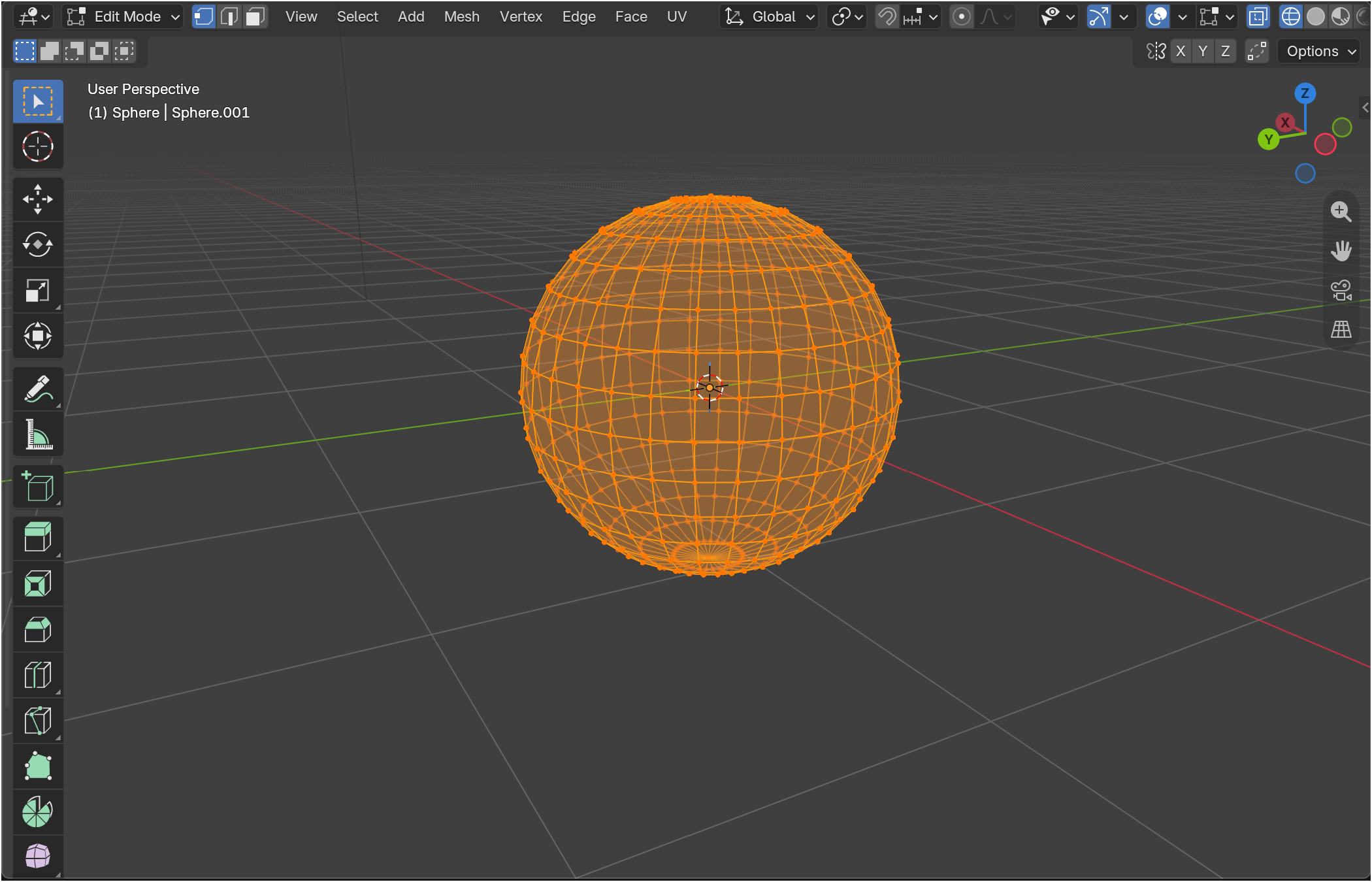
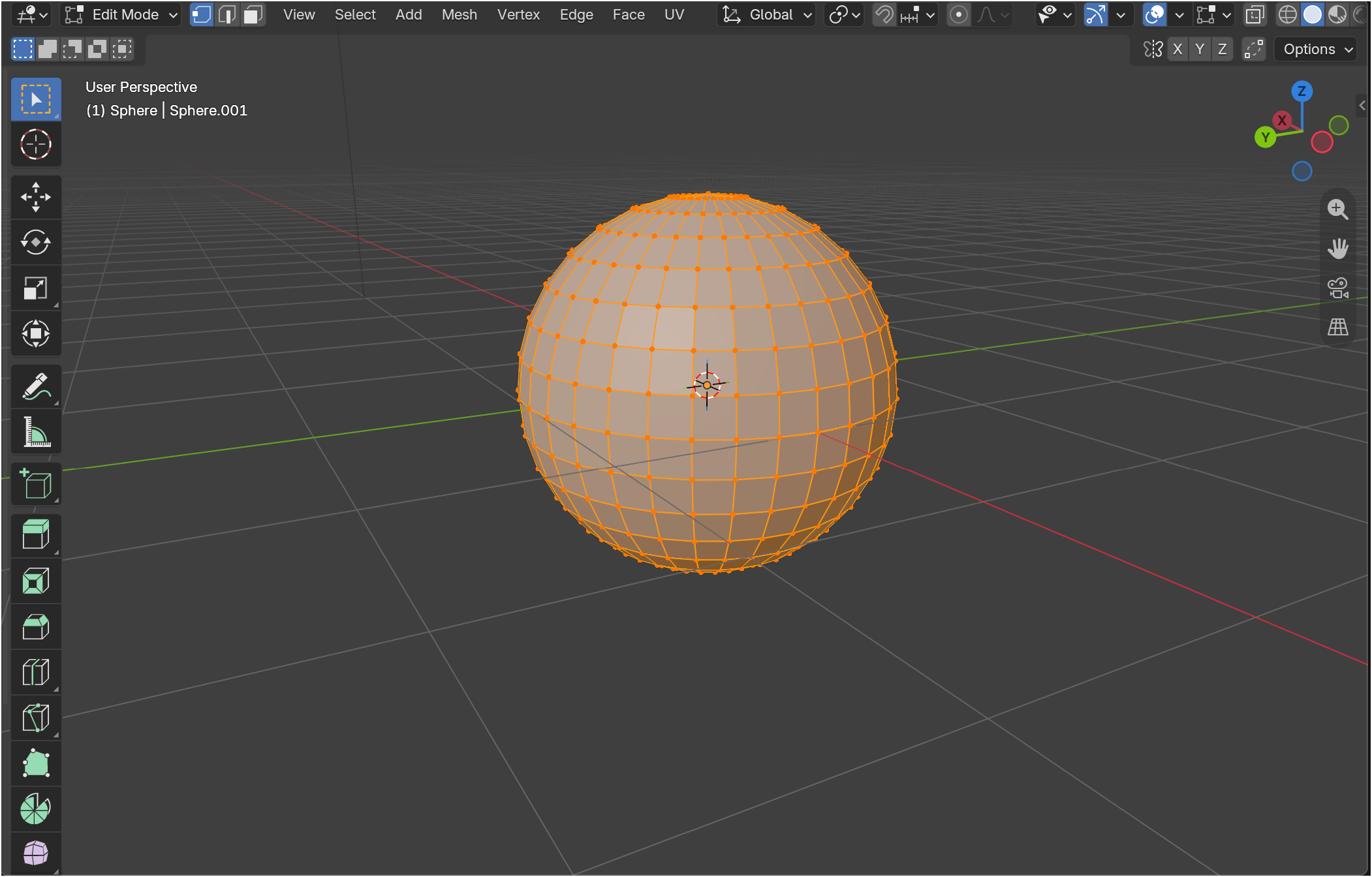
我们可以先借由 blender 的球模型来进行图示理解。
下面将从我的认知顺序,进行对其具体理解的阐述。
Different spaces 不同的坐标空间
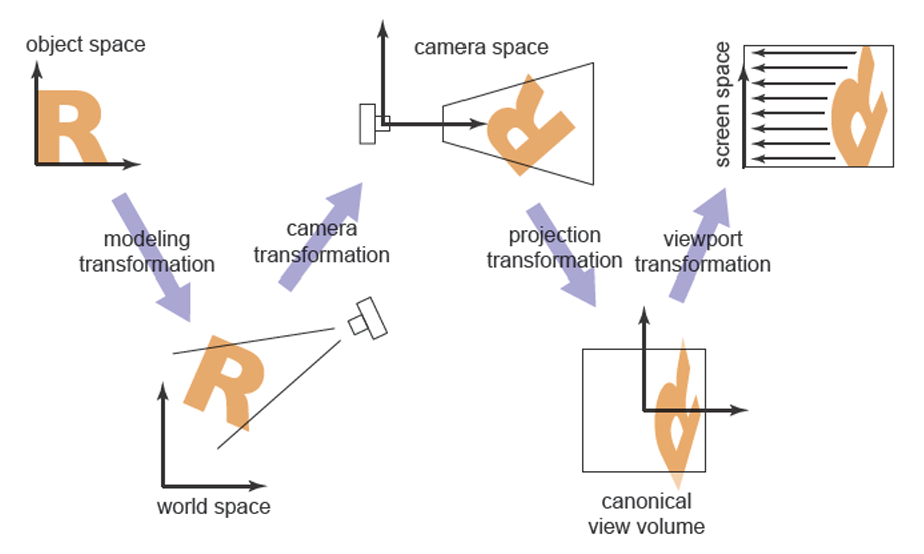
我们先从虎书的一张示意图开始了解。
虎书 Figure8.2. The sequence of spaces and transformation that gets objects from their original coordinates into screen space.
能够看到,起点是 object space(物体空间) ,而终点是 screen space(屏幕空间) 。在这之中,进行了多个坐标空间的转换,其中在第四个空间这里和 games101 讲述有所出入
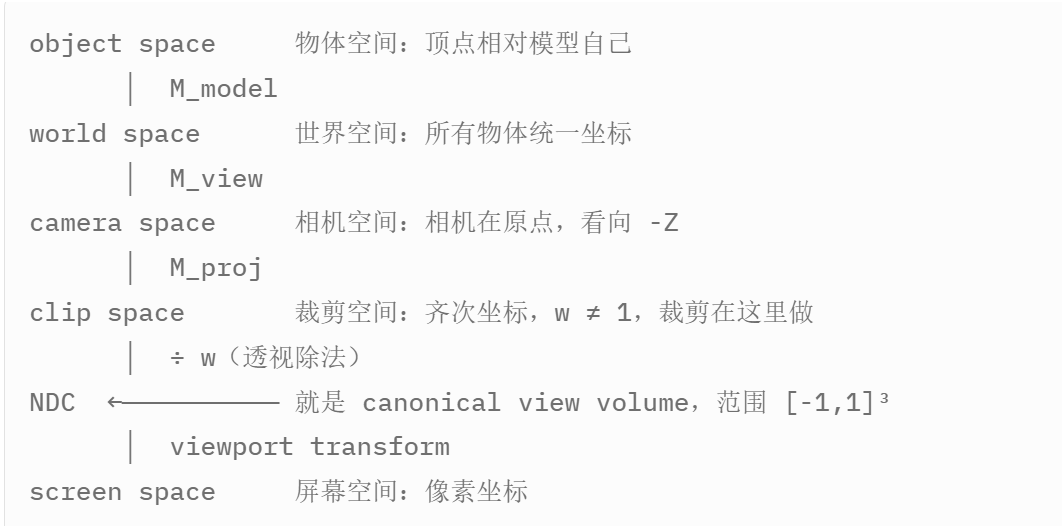
我将日常习惯罗列出来,注意和虎书示意图不同的地方
object space(物体空间) -> world space(世界空间) -> camera space(相机空间)
-> clip space(裁剪空间) -> NDC -> screen space(屏幕空间)
虎书并不单独区分 clip space 和 NDC,而是把「投影 + 透视除法」之后得到的那个 [ − 1 , 1 ] 3 [-1,1]^3 [ − 1 , 1 ] 3 object space -> world space -> camera space -> clip space 4 个坐标空间,3 次变换的过程
理解了 MVP 所代表的过程范围,下面来具体理解 matrix(矩阵)和 transformation(变换)
如何理解将一个在坐标空间变换到另一个坐标空间? 在这里我们可以从 Unity shader 入门精要的文段中进行理解。
Unity shader 入门精要 4.6.2 坐标空间的变换
总结来说,对于我们要进行的 MVP 坐标空间变换,即是通过数学将各个点和矢量 改变成对应坐标空间内的形态。而在数学上,我们拥有一个便捷直观的工具来进行运算,它即是 Matrix 矩阵 。
也就是说,我们用矩阵来表达 Transformation 变换 ,使用矩阵来计算具体坐标。
下面我们来到正式认知 MVP 三大变换,先来宏观浏览
M_model, M_view, M_proj 均为简写,全称见下文
我们已经知道 MVP 指的是 object space -> world space -> camera space -> clip space 的过程。那么显然三大变换就是
(1) object space → world space —— Modeling transformation
(2) world space → camera space —— Camera transformation/View transformation
(3) camera space → clip space —— Projection transformation
显然 MVP 采取的是三步变换的首字母
认识到 MVP 的指代后,下一步自然是如何去实现每个变换。
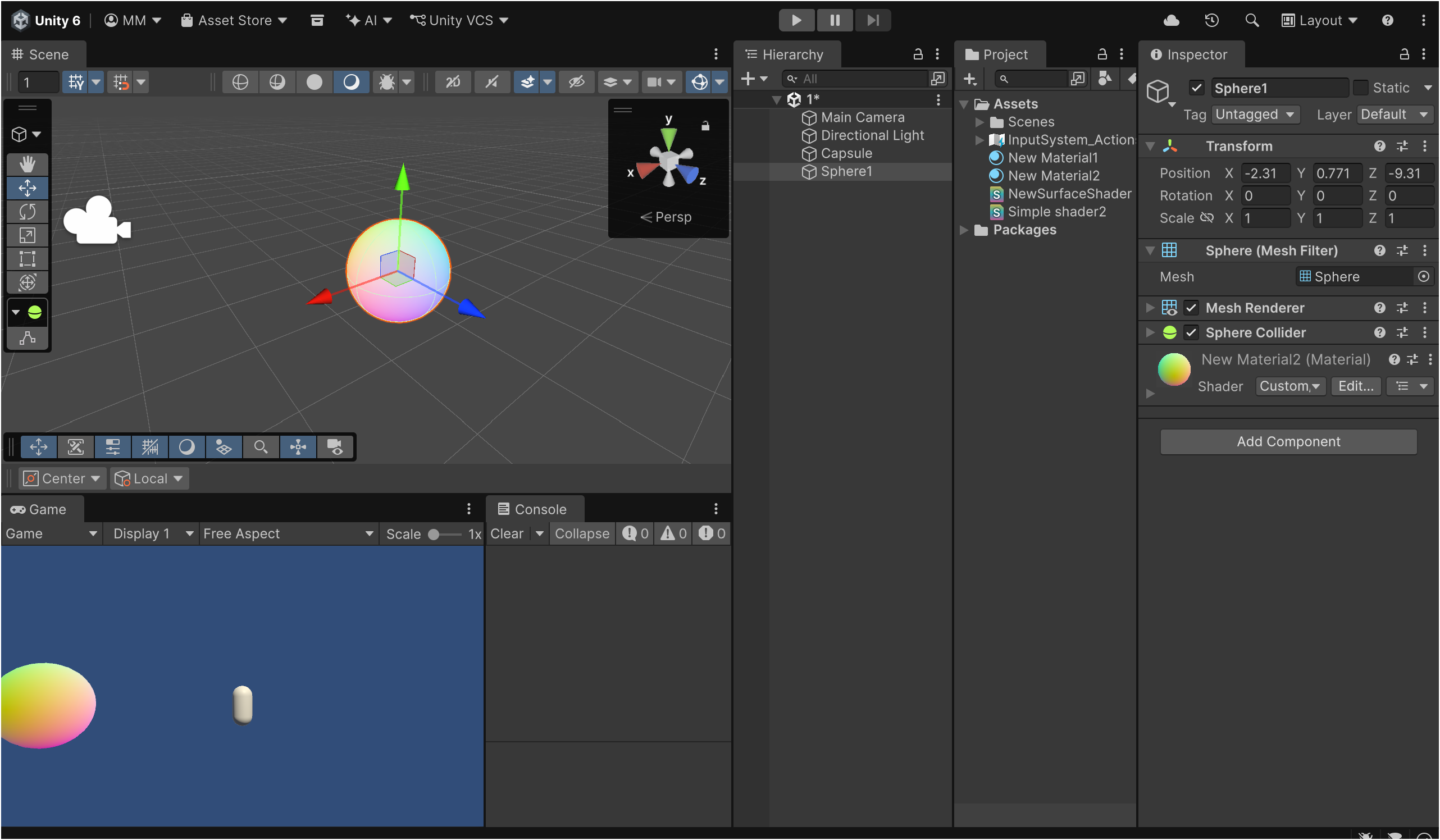
如何理解从模型空间变换到世界空间? 我们可以借助 unity 来直观看到。
注意看到彩色小球身上的坐标轴,它正是小球自身的模型空间体现,这个物体拥有自己的原点,三条坐标轴。
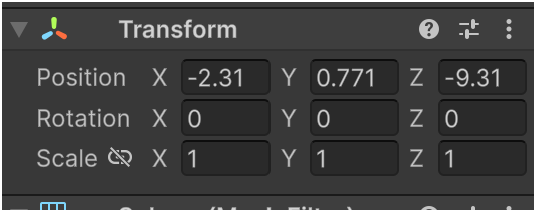
所以可以看到 Inspector 的 Transform 属性中,小球的 position 为一个可以用(x,y,z)表示的点。
模型空间的原点转变成世界空间的一个点,模型空间的三条坐标轴方向转变成世界空间的三条坐标轴方向。
M m o d e l = T ⋅ R ⋅ S = [ 1 0 0 t x 0 1 0 t y 0 0 1 t z 0 0 0 1 ] [ cos θ 0 sin θ 0 0 1 0 0 − sin θ 0 cos θ 0 0 0 0 1 ] [ k x 0 0 0 0 k y 0 0 0 0 k z 0 0 0 0 1 ] M_{\mathrm{model}} = T \cdot R \cdot S =
\begin{bmatrix}
1 & 0 & 0 & t_x \\
0 & 1 & 0 & t_y \\
0 & 0 & 1 & t_z \\
0 & 0 & 0 & 1
\end{bmatrix}
\begin{bmatrix}
\cos\theta & 0 & \sin\theta & 0 \\
0 & 1 & 0 & 0 \\
-\sin\theta & 0 & \cos\theta & 0 \\
0 & 0 & 0 & 1
\end{bmatrix}
\begin{bmatrix}
k_x & 0 & 0 & 0 \\
0 & k_y & 0 & 0 \\
0 & 0 & k_z & 0 \\
0 & 0 & 0 & 1
\end{bmatrix} M model = T ⋅ R ⋅ S = 1 0 0 0 0 1 0 0 0 0 1 0 t x t y t z 1 cos θ 0 − sin θ 0 0 1 0 0 sin θ 0 cos θ 0 0 0 0 1 k x 0 0 0 0 k y 0 0 0 0 k z 0 0 0 0 1
这里 T R S 分别代表着 Translate 位移 Rotation 旋转 Scale 位移 三种矩阵,从右往左矩阵相乘计算
这里给出一个书上的代值计算实例
Unity shader 入门精要 4.6.5 世界空间
M m o d e l = [ 1 0 0 5 0 1 0 0 0 0 1 25 0 0 0 1 ] [ − 0.866 0 0.5 0 0 1 0 0 − 0.5 0 − 0.866 0 0 0 0 1 ] [ 2 0 0 0 0 2 0 0 0 0 2 0 0 0 0 1 ] = [ − 1.732 0 1 5 0 2 0 0 − 1 0 − 1.732 25 0 0 0 1 ] \begin{aligned}
M_{\mathrm{model}}
&= \begin{bmatrix}
1 & 0 & 0 & 5 \\
0 & 1 & 0 & 0 \\
0 & 0 & 1 & 25 \\
0 & 0 & 0 & 1
\end{bmatrix}
\begin{bmatrix}
-0.866 & 0 & 0.5 & 0 \\
0 & 1 & 0 & 0 \\
-0.5 & 0 & -0.866 & 0 \\
0 & 0 & 0 & 1
\end{bmatrix}
\begin{bmatrix}
2 & 0 & 0 & 0 \\
0 & 2 & 0 & 0 \\
0 & 0 & 2 & 0 \\
0 & 0 & 0 & 1
\end{bmatrix} \\
&= \begin{bmatrix}
-1.732 & 0 & 1 & 5 \\
0 & 2 & 0 & 0 \\
-1 & 0 & -1.732 & 25 \\
0 & 0 & 0 & 1
\end{bmatrix}
\end{aligned} M model = 1 0 0 0 0 1 0 0 0 0 1 0 5 0 25 1 − 0.866 0 − 0.5 0 0 1 0 0 0.5 0 − 0.866 0 0 0 0 1 2 0 0 0 0 2 0 0 0 0 2 0 0 0 0 1 = − 1.732 0 − 1 0 0 2 0 0 1 0 − 1.732 0 5 0 25 1 p w o r l d = M m o d e l p m o d e l = [ − 1.732 0 1 5 0 2 0 0 − 1 0 − 1.732 25 0 0 0 1 ] [ 0 2 4 1 ] = [ 9 4 18.072 1 ] \mathbf{p}_{\mathrm{world}} = M_{\mathrm{model}} \mathbf{p}_{\mathrm{model}} =
\begin{bmatrix}
-1.732 & 0 & 1 & 5 \\
0 & 2 & 0 & 0 \\
-1 & 0 & -1.732 & 25 \\
0 & 0 & 0 & 1
\end{bmatrix}
\begin{bmatrix} 0 \\ 2 \\ 4 \\ 1 \end{bmatrix}
=
\begin{bmatrix} 9 \\ 4 \\ 18.072 \\ 1 \end{bmatrix} p world = M model p model = − 1.732 0 − 1 0 0 2 0 0 1 0 − 1.732 0 5 0 25 1 0 2 4 1 = 9 4 18.072 1 camera space 摄像机空间,也被称为 view space 观察空间。
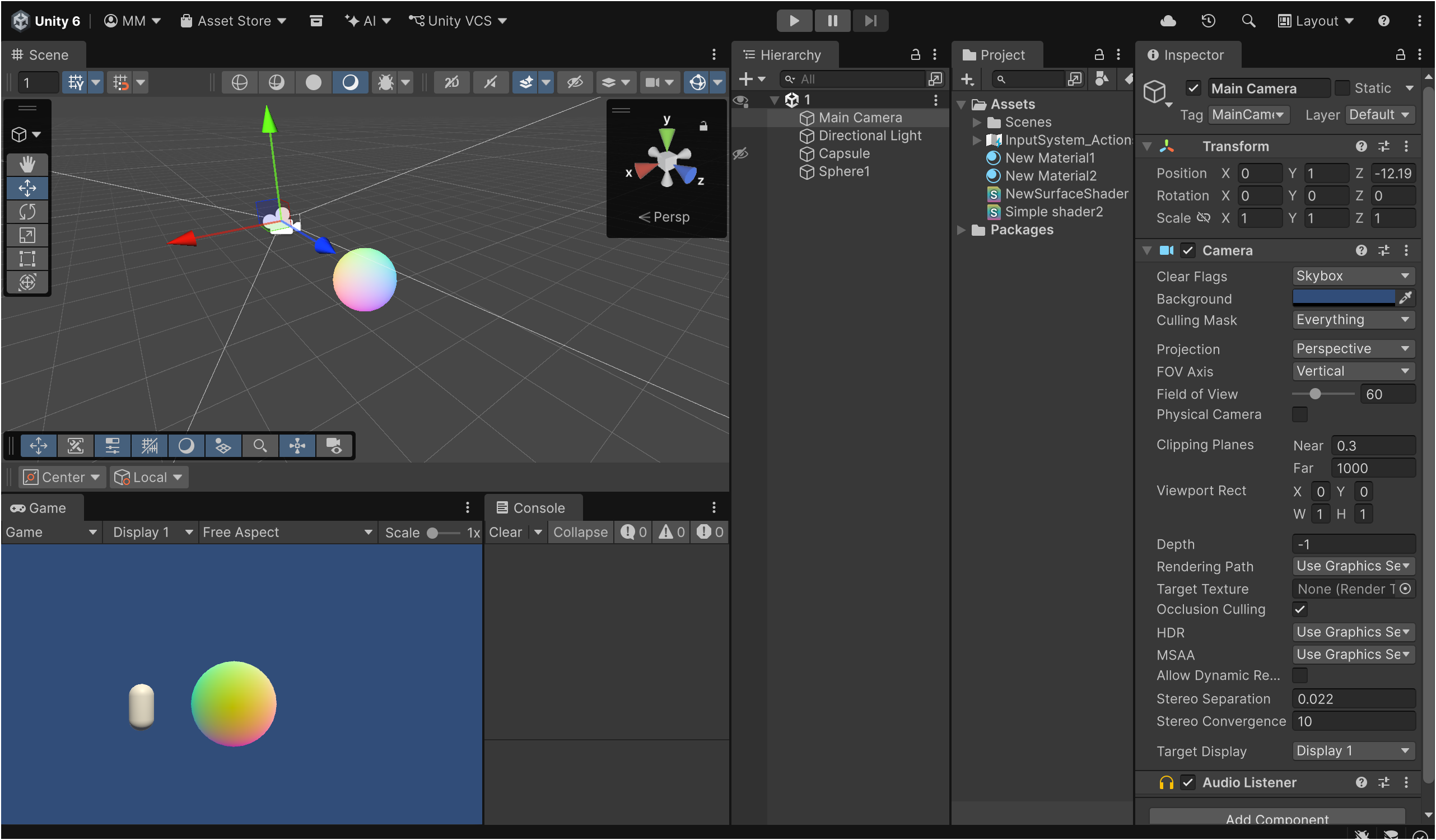
依旧用 Unity 来进行直观感受
这里可以使用一个技巧,我们的目的是将 world space 坐标下的物体以 camera 自身坐标空间来表示,也就是得将 world space 坐标矩阵变到 camera space。
在世界坐标下,将 camera 移动至 world space 的原点。
移动后,将 camera 三条轴向旋转至世界 x,y,z 轴向。
(注意!)由于选择的左右手坐标系不同,常会有 Z 的朝向恰好相反的出现
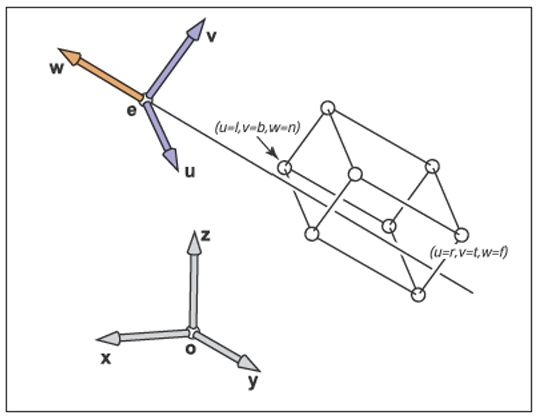
虎书 8.1.3 The Camera Transformation
虎书 8.1 Viewing Transformation
之后再把达到这个功能的 Matrix 乘给 world space 下的物体 Matrix 即可做到第二步变换 Camera Transformation
Unity shader 入门精要 4.6.6 观察空间
摄像机的世界变换是先按 ( 30 , 0 , 0 ) (30, 0, 0) ( 30 , 0 , 0 ) ( 0 , 10 , − 10 ) (0, 10, -10) ( 0 , 10 , − 10 ) 逆变换 :先平移 ( 0 , − 10 , 10 ) (0, -10, 10) ( 0 , − 10 , 10 ) − 30 ∘ -30^\circ − 3 0 ∘
M v i e w = [ 1 0 0 0 0 cos θ − sin θ 0 0 sin θ cos θ 0 0 0 0 1 ] [ 1 0 0 t x 0 1 0 t y 0 0 1 t z 0 0 0 1 ] = [ 1 0 0 0 0 0.866 0.5 0 0 − 0.5 0.866 0 0 0 0 1 ] [ 1 0 0 0 0 1 0 − 10 0 0 1 10 0 0 0 1 ] = [ 1 0 0 0 0 0.866 0.5 − 3.66 0 − 0.5 0.866 13.66 0 0 0 1 ] \begin{aligned}
M_{\mathrm{view}} &=
\begin{bmatrix}
1 & 0 & 0 & 0 \\
0 & \cos\theta & -\sin\theta & 0 \\
0 & \sin\theta & \cos\theta & 0 \\
0 & 0 & 0 & 1
\end{bmatrix}
\begin{bmatrix}
1 & 0 & 0 & t_x \\
0 & 1 & 0 & t_y \\
0 & 0 & 1 & t_z \\
0 & 0 & 0 & 1
\end{bmatrix} \\
&=
\begin{bmatrix}
1 & 0 & 0 & 0 \\
0 & 0.866 & 0.5 & 0 \\
0 & -0.5 & 0.866 & 0 \\
0 & 0 & 0 & 1
\end{bmatrix}
\begin{bmatrix}
1 & 0 & 0 & 0 \\
0 & 1 & 0 & -10 \\
0 & 0 & 1 & 10 \\
0 & 0 & 0 & 1
\end{bmatrix} \\
&=
\begin{bmatrix}
1 & 0 & 0 & 0 \\
0 & 0.866 & 0.5 & -3.66 \\
0 & -0.5 & 0.866 & 13.66 \\
0 & 0 & 0 & 1
\end{bmatrix}
\end{aligned} M view = 1 0 0 0 0 cos θ sin θ 0 0 − sin θ cos θ 0 0 0 0 1 1 0 0 0 0 1 0 0 0 0 1 0 t x t y t z 1 = 1 0 0 0 0 0.866 − 0.5 0 0 0.5 0.866 0 0 0 0 1 1 0 0 0 0 1 0 0 0 0 1 0 0 − 10 10 1 = 1 0 0 0 0 0.866 − 0.5 0 0 0.5 0.866 0 0 − 3.66 13.66 1
由于观察空间使用的是右手坐标系 ,还需要对 z z z M n e g a t e _ z M_{\mathrm{negate\_z}} M negate_z
M v i e w = M n e g a t e _ z M v i e w = [ 1 0 0 0 0 1 0 0 0 0 − 1 0 0 0 0 1 ] [ 1 0 0 0 0 0.866 0.5 − 3.66 0 − 0.5 0.866 13.66 0 0 0 1 ] = [ 1 0 0 0 0 0.866 0.5 − 3.66 0 0.5 − 0.866 − 13.66 0 0 0 1 ] \begin{aligned}
M_{\mathrm{view}} &= M_{\mathrm{negate\_z}} \, M_{\mathrm{view}} \\
&=
\begin{bmatrix}
1 & 0 & 0 & 0 \\
0 & 1 & 0 & 0 \\
0 & 0 & -1 & 0 \\
0 & 0 & 0 & 1
\end{bmatrix}
\begin{bmatrix}
1 & 0 & 0 & 0 \\
0 & 0.866 & 0.5 & -3.66 \\
0 & -0.5 & 0.866 & 13.66 \\
0 & 0 & 0 & 1
\end{bmatrix} \\
&=
\begin{bmatrix}
1 & 0 & 0 & 0 \\
0 & 0.866 & 0.5 & -3.66 \\
0 & 0.5 & -0.866 & -13.66 \\
0 & 0 & 0 & 1
\end{bmatrix}
\end{aligned} M view = M negate_z M view = 1 0 0 0 0 1 0 0 0 0 − 1 0 0 0 0 1 1 0 0 0 0 0.866 − 0.5 0 0 0.5 0.866 0 0 − 3.66 13.66 1 = 1 0 0 0 0 0.866 0.5 0 0 0.5 − 0.866 0 0 − 3.66 − 13.66 1
现在可以用它做顶点变换了:
p v i e w = M v i e w p w o r l d = [ 1 0 0 0 0 0.866 0.5 − 3.66 0 0.5 − 0.866 − 13.66 0 0 0 1 ] [ 9 4 18.072 1 ] = [ 9 8.84 − 27.31 1 ] \begin{aligned}
\mathbf{p}_{\mathrm{view}} &= M_{\mathrm{view}} \, \mathbf{p}_{\mathrm{world}} \\
&=
\begin{bmatrix}
1 & 0 & 0 & 0 \\
0 & 0.866 & 0.5 & -3.66 \\
0 & 0.5 & -0.866 & -13.66 \\
0 & 0 & 0 & 1
\end{bmatrix}
\begin{bmatrix} 9 \\ 4 \\ 18.072 \\ 1 \end{bmatrix}
=
\begin{bmatrix} 9 \\ 8.84 \\ -27.31 \\ 1 \end{bmatrix}
\end{aligned} p view = M view p world = 1 0 0 0 0 0.866 0.5 0 0 0.5 − 0.866 0 0 − 3.66 − 13.66 1 9 4 18.072 1 = 9 8.84 − 27.31 1
于是得到了 camera space 中的位置(9,8.84,-27.31)
投影变换是从 camera space 到 clip space 的过程,变换的矩阵叫做 projection matrix(投影矩阵)或者 clip matrix(裁剪矩阵)。 view frustum 视锥体
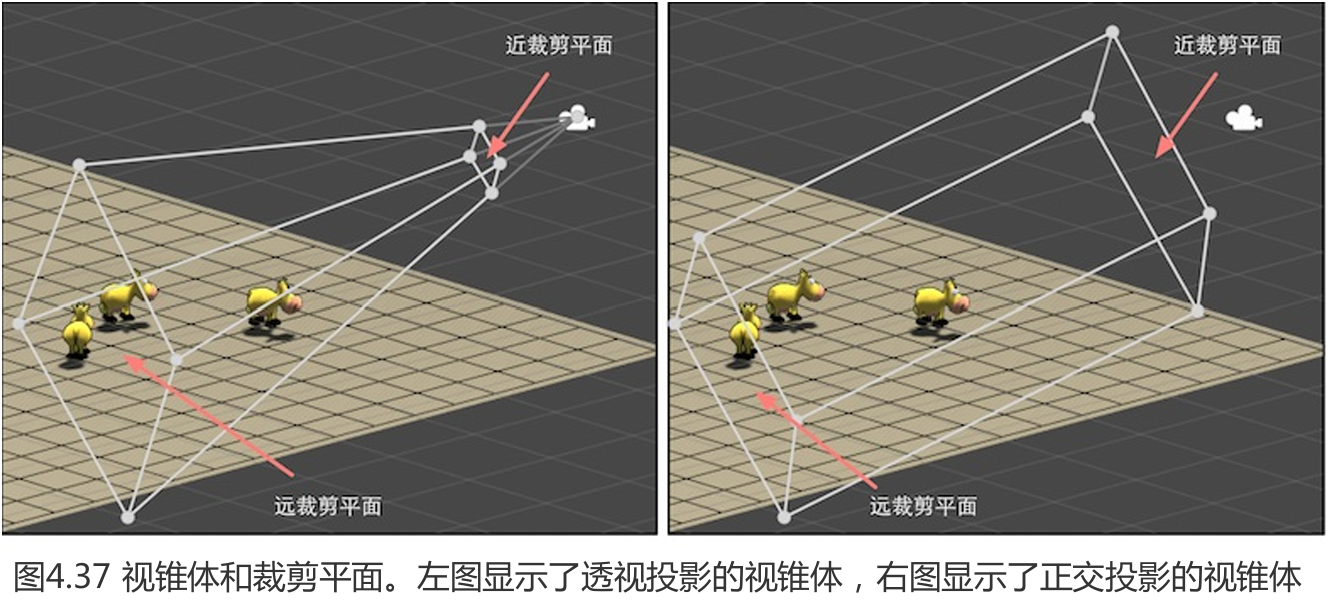
值得注意的是,视锥体分为两个类型,也就是说 projection transformation 分为两种投影,一种是 orthographic projectio(正交投影) ,一种是 perspective projectio(透视投影)
我们先借图来理解两种投影视锥体
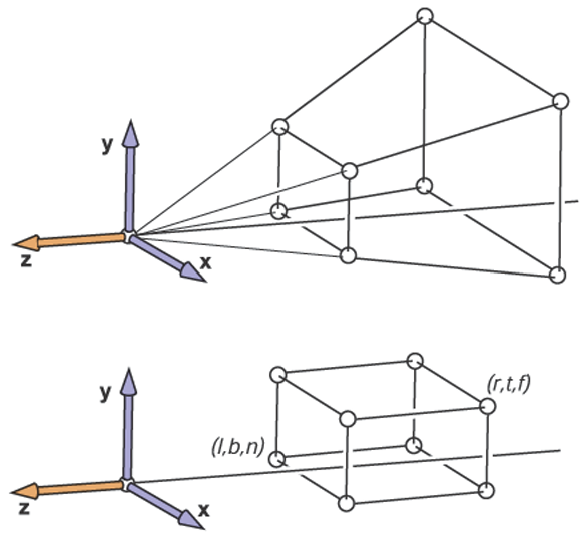
虎书 Figure 8.12. 上为 perspective projection 下为 orthographic projection
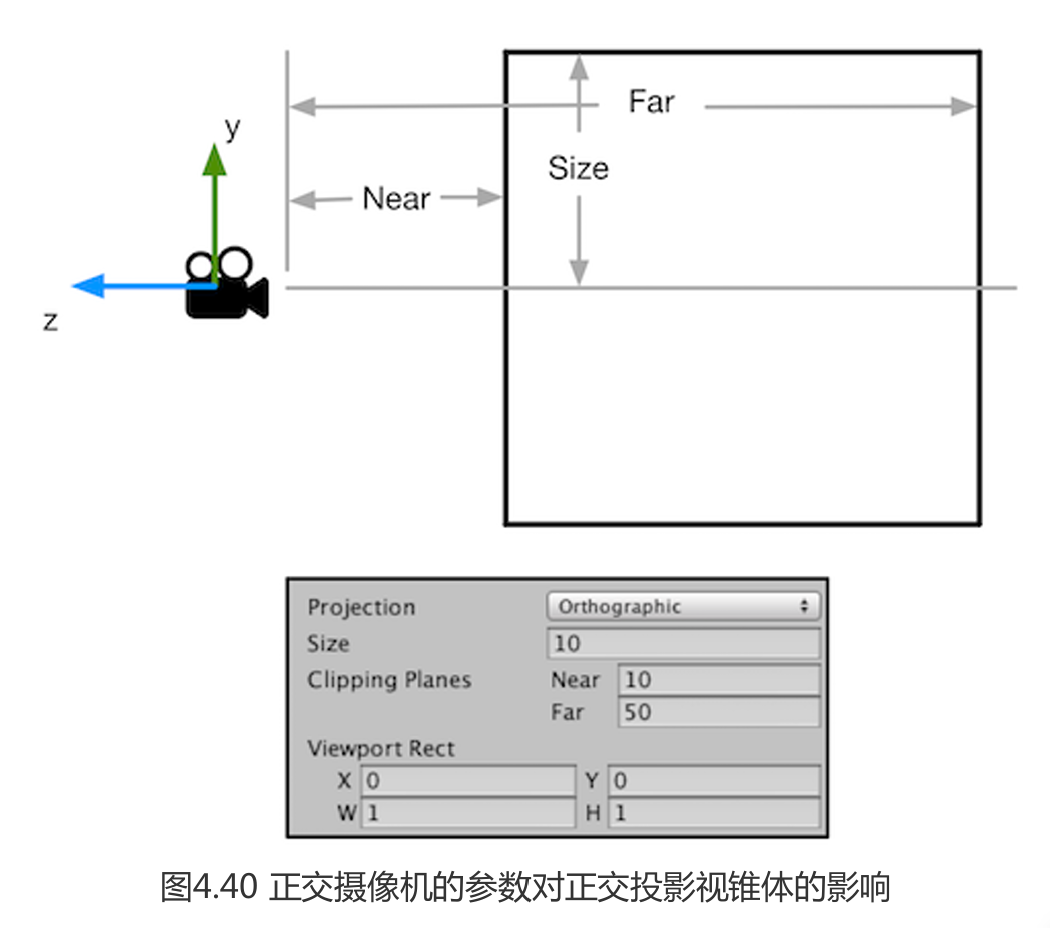
首先我们得清楚视锥体共有 6 块裁剪平面,其中有两块裁剪平面尤为特殊, near clip plan(近剪裁平面) 和 far clip plan(远剪裁平面) ,它们决定了摄像机可以看到的深度范围。
Unity shader 入门精要 4.6.7
如何理解投影? 可以理解成一个空间的降维,但投影矩阵实际上并没有执行降维,只是为后续在真正的投影,即屏幕映射的齐次除法做准备。
我们先看 orthographic projection 正交投影
Unity shader 入门精要 4.6.7
我们先确定好变量指代 l,r(近平面上的左、右边界), b,t(近平面上的下、上边界), n,f(近、远平面距离)
推得正交投影的投影矩阵为:
M o r t h o = [ 2 r − l 0 0 − r + l r − l 0 2 t − b 0 − t + b t − b 0 0 − 2 f − n − f + n f − n 0 0 0 1 ] M_{\mathrm{ortho}} =
\begin{bmatrix}
\dfrac{2}{r-l} & 0 & 0 & -\dfrac{r+l}{r-l} \\[6pt]
0 & \dfrac{2}{t-b} & 0 & -\dfrac{t+b}{t-b} \\[6pt]
0 & 0 & -\dfrac{2}{f-n} & -\dfrac{f+n}{f-n} \\[6pt]
0 & 0 & 0 & 1
\end{bmatrix} M ortho = r − l 2 0 0 0 0 t − b 2 0 0 0 0 − f − n 2 0 − r − l r + l − t − b t + b − f − n f + n 1 此时当我们选择使用正交投影时,即可在得到投影矩阵后进行计算:
p c l i p = M o r t h o p v i e w = [ 2 r − l 0 0 − r + l r − l 0 2 t − b 0 − t + b t − b 0 0 − 2 f − n − f + n f − n 0 0 0 1 ] [ x y z 1 ] = [ 2 x − ( r + l ) r − l 2 y − ( t + b ) t − b − 2 z f − n − f + n f − n 1 ] \mathbf{p}_{\mathrm{clip}} = M_{\mathrm{ortho}} \, \mathbf{p}_{\mathrm{view}} =
\begin{bmatrix}
\dfrac{2}{r-l} & 0 & 0 & -\dfrac{r+l}{r-l} \\[6pt]
0 & \dfrac{2}{t-b} & 0 & -\dfrac{t+b}{t-b} \\[6pt]
0 & 0 & -\dfrac{2}{f-n} & -\dfrac{f+n}{f-n} \\[6pt]
0 & 0 & 0 & 1
\end{bmatrix}
\begin{bmatrix} x \\ y \\ z \\ 1 \end{bmatrix}
=
\begin{bmatrix}
\dfrac{2x-(r+l)}{r-l} \\[8pt]
\dfrac{2y-(t+b)}{t-b} \\[8pt]
-\dfrac{2z}{f-n}-\dfrac{f+n}{f-n} \\[8pt]
1
\end{bmatrix} p clip = M ortho p view = r − l 2 0 0 0 0 t − b 2 0 0 0 0 − f − n 2 0 − r − l r + l − t − b t + b − f − n f + n 1 x y z 1 = r − l 2 x − ( r + l ) t − b 2 y − ( t + b ) − f − n 2 z − f − n f + n 1 接着我们来看 perspective projection 透视投影
如图,在透视投影中,我们也引入近平面和远平面的概念,用来限定可见的距离范围。在这个语境下,我们把近平面当作投影平面,于是像平面距离为− n -n − n x , y x,y x , y
y s = n z y , x s = n z x y_s = \frac{n}{z}\,y, \qquad x_s = \frac{n}{z}\,x y s = z n y , x s = z n x 也就是说,我们仍可以用矩阵来完成这步映射:
虎书给出了这样一个矩阵 (留意第三行,这是人为约束解出的)
P = [ n 0 0 0 0 n 0 0 0 0 n + f − f n 0 0 1 0 ] . \mathbf{P} =
\begin{bmatrix}
n & 0 & 0 & 0 \\
0 & n & 0 & 0 \\
0 & 0 & n+f & -fn \\
0 & 0 & 1 & 0
\end{bmatrix}. P = n 0 0 0 0 n 0 0 0 0 n + f 1 0 0 − f n 0 .
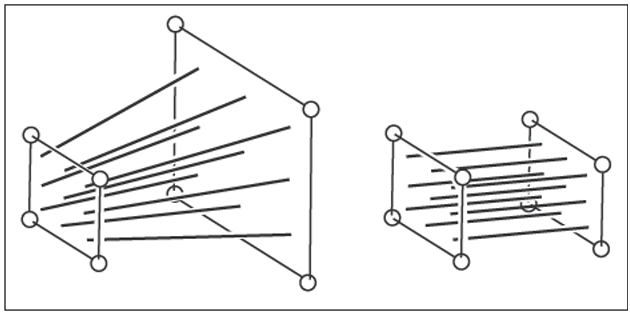
因为 z z z z z z y s y_s y s w ′ = − z w'=-z w ′ = − z 挤压矩阵 :
M p e r s p → o r t h o = [ n 0 0 0 0 n 0 0 0 0 n + f n f 0 0 − 1 0 ] M_{\mathrm{persp}\to\mathrm{ortho}} =
\begin{bmatrix}
n & 0 & 0 & 0 \\
0 & n & 0 & 0 \\
0 & 0 & n+f & nf \\
0 & 0 & -1 & 0
\end{bmatrix} M persp → ortho = n 0 0 0 0 n 0 0 0 0 n + f − 1 0 0 n f 0 挤压矩阵的作用,只是把透视视景体映射到正交视景体,也就是说,接下来的步骤和正交投影一致了。
M o r t h o = [ 2 r − l 0 0 − r + l r − l 0 2 t − b 0 − t + b t − b 0 0 − 2 f − n − f + n f − n 0 0 0 1 ] M_{\mathrm{ortho}} =
\begin{bmatrix}
\dfrac{2}{r-l} & 0 & 0 & -\dfrac{r+l}{r-l} \\[6pt]
0 & \dfrac{2}{t-b} & 0 & -\dfrac{t+b}{t-b} \\[6pt]
0 & 0 & -\dfrac{2}{f-n} & -\dfrac{f+n}{f-n} \\[6pt]
0 & 0 & 0 & 1
\end{bmatrix} M ortho = r − l 2 0 0 0 0 t − b 2 0 0 0 0 − f − n 2 0 − r − l r + l − t − b t + b − f − n f + n 1 M p e r s p = M o r t h o ⋅ M p e r s p → o r t h o = [ 2 n r − l 0 r + l r − l 0 0 2 n t − b t + b t − b 0 0 0 − f + n f − n − 2 f n f − n 0 0 − 1 0 ] \begin{aligned}
M_{\mathrm{persp}} &= M_{\mathrm{ortho}} \cdot M_{\mathrm{persp}\to\mathrm{ortho}} \\[6pt]
&=
\begin{bmatrix}
\dfrac{2n}{r-l} & 0 & \dfrac{r+l}{r-l} & 0 \\[6pt]
0 & \dfrac{2n}{t-b} & \dfrac{t+b}{t-b} & 0 \\[6pt]
0 & 0 & -\dfrac{f+n}{f-n} & -\dfrac{2fn}{f-n} \\[6pt]
0 & 0 & -1 & 0
\end{bmatrix}
\end{aligned} M persp = M ortho ⋅ M persp → ortho = r − l 2 n 0 0 0 0 t − b 2 n 0 0 r − l r + l t − b t + b − f − n f + n − 1 0 0 − f − n 2 f n 0 最后进行透视投影的计算:
p c l i p = M p e r s p p v i e w = [ 2 n r − l 0 r + l r − l 0 0 2 n t − b t + b t − b 0 0 0 − f + n f − n − 2 f n f − n 0 0 − 1 0 ] [ x y z 1 ] = [ 2 n x + ( r + l ) z r − l 2 n y + ( t + b ) z t − b − f + n f − n z − 2 f n f − n − z ] \mathbf{p}_{\mathrm{clip}} = M_{\mathrm{persp}} \, \mathbf{p}_{\mathrm{view}} =
\begin{bmatrix}
\dfrac{2n}{r-l} & 0 & \dfrac{r+l}{r-l} & 0 \\[6pt]
0 & \dfrac{2n}{t-b} & \dfrac{t+b}{t-b} & 0 \\[6pt]
0 & 0 & -\dfrac{f+n}{f-n} & -\dfrac{2fn}{f-n} \\[6pt]
0 & 0 & -1 & 0
\end{bmatrix}
\begin{bmatrix} x \\ y \\ z \\ 1 \end{bmatrix}
=
\begin{bmatrix}
\dfrac{2n\,x + (r+l)\,z}{r-l} \\[8pt]
\dfrac{2n\,y + (t+b)\,z}{t-b} \\[8pt]
-\dfrac{f+n}{f-n}z - \dfrac{2fn}{f-n} \\[8pt]
-z
\end{bmatrix} p clip = M persp p view = r − l 2 n 0 0 0 0 t − b 2 n 0 0 r − l r + l t − b t + b − f − n f + n − 1 0 0 − f − n 2 f n 0 x y z 1 = r − l 2 n x + ( r + l ) z t − b 2 n y + ( t + b ) z − f − n f + n z − f − n 2 f n − z 至此,我们将坐标从相机空间转换到了裁剪空间,完成了 MVP Transformation 的最后一步 Projection transformation。
结语 About Application
在 Unity shader 中,MVP Transformation 步骤并不是要求写者将这些矩阵一一列出来计算,而是给出了内置矩阵变量,只需要调用即可进行使用。
例如 CG 语言中的 UNITY_MATRIX_MVP 。而在 games101 的前置作业中,实现软光栅则是需要将其拆解细究。
写 blog 感觉思绪厘清了很多。 _ovoY